Building Sidekick: How I Used AI to Fix Incident Response
Co-written with Chris Watson.
In March 2026, I stood in front of senior leadership to demo a tool we’d built in our spare time. It analyzed bug tickets and triaged CI failures. It reviewed pull requests, ran on a CI pipeline every ten minutes, and we’d built the whole thing in about three weeks.
The feedback was blunt: the presentation was scattered, but the tool was solid. We shipped rough, fixed what broke, and polished later.
The Problem
My team handles backend infrastructure for a complex product surface. A customer hits a bug or a CI test starts failing. Someone reads the ticket, finds the relevant code, traces the call chain, checks for prior incidents, and writes a diagnosis. On a good day that takes an hour. On a bad day the ticket sits in a queue because the team is heads-down on sprint work.
Code reviews had a similar bottleneck. PRs sat for days waiting for a reviewer with enough context to give useful feedback. The reviews that did happen stayed surface-level because the reviewer didn’t have time to trace changed code paths back to their callers.
We wanted to stop losing time.
Week One: The Ugly Prototype
The first version was a bash script that called the Kiro CLI, with Claude Opus behind it, and a bug ticket pasted into the prompt. No pipeline, no automation. I ran it from my laptop.
The output was bad. The AI hallucinated function names, referenced files that didn’t exist, mixed up context from previous conversations. Demoralizing when you’re trying to convince yourself this is worth pursuing.
A conversation with my manager shaped the rest of the project: we had a context problem. We were dumping ticket descriptions and stack traces into a single prompt and hoping the AI would sort it out. It couldn’t.
The Context Architecture
We rebuilt the prompt pipeline from scratch.
Give the AI less. We wrote steering files that told the agent what to do and what to ignore. Each file stayed under two thousand tokens. If a piece of context wasn’t needed on every run, it didn’t go in the base prompt.
Isolate tasks. Instead of one long conversation, the analysis agent delegates code exploration to a subagent with its own clean context window. The parent gets back a summary. No cross-contamination between ticket analysis and codebase search.
Inject environment automatically. The agent knows which repo to search, which branch to check out, where the steering files live. The engineer doesn’t narrate any of this. Hooks and setup scripts handle it before the agent sees its first token.
I wrote about this architecture in a broader piece on AI context management. Sidekick was where we proved it worked. We didn’t have a name for it yet, but this was the start of the harness, the scaffolding around the model.
The Pipeline
A scheduled CI pipeline runs every ten minutes, polling our issue tracker for tickets that someone labels for analysis. It triggers a child pipeline that:
- Fetches the full ticket: description, comments, attachments, linked issues
- Searches for similar past incidents
- Clones the relevant repo and checks out the affected branch
- Hands everything to the AI agent with structured instructions
- Extracts the analysis from the agent’s output
- Uploads it back to the ticket and posts to team chat
Code review follows the same pattern. Label a ticket for review, and the pipeline fetches the linked PR, grabs the diff, and produces a structured review with file-level risk triage and severity-ranked findings.
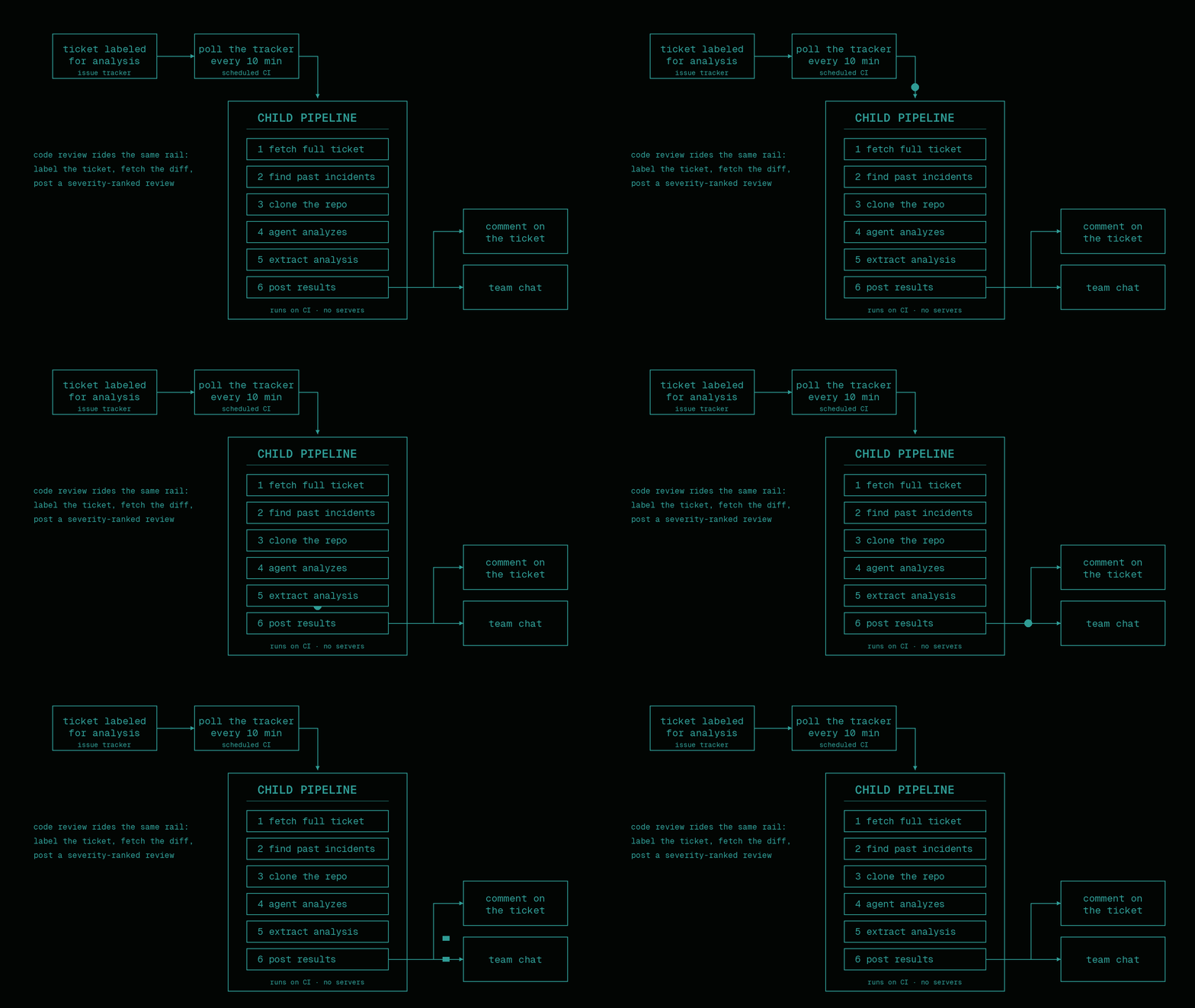
The system runs on CI. No custom infrastructure. No servers to maintain.
What Broke
The pipeline failed in ways I didn’t anticipate.
The TUI problem. The Kiro CLI has a terminal UI with progress spinners and status bars. In CI, those render into the output stream. Our first successful analysis was 161KB of garbled ANSI escape codes mixed with actual content. The fix: three CLI flags to disable the TUI, skip interactive prompts, and auto-approve tool calls. Three flags that took two days to discover.
The protocol crash. The first time the agent tried to query our issue tracker through its protocol server, the CLI crashed. Exit code 1, no useful error. We ripped out the dependency and had the agent use REST API calls. Simpler and more reliable.
The retry loop. The review pipeline couldn’t find a PR link in a ticket, so it removed the pending label but left the needed label. The next poll cycle rediscovered the ticket and triggered another run. And another. We found it after the pipeline had posted six duplicate “analysis started” comments to the same ticket.
Autonomous systems don’t call you when something goes wrong. They handle the failure or they don’t.
Going Headless
The original setup required a local runner on a developer’s desk. The Kiro CLI authenticated through a browser, so someone had to log in manually. This worked for our team but killed adoption for anyone else.
In April 2026, we migrated to headless mode: shared CI runners with API key authentication. No local machine required. The setup script installs the CLI, clones the repos, configures the agent, and runs the analysis. A new team can onboard in fifteen minutes.
We built an automatic fallback for quota exhaustion. If the API key runs dry mid-pipeline, the system detects the failure, triggers a new pipeline targeting a local runner, and retries there. A guard prevents infinite loops: the local pipeline never triggers another fallback.
What Worked
The tool caught real bugs. It one-shotted an obscure upgrade issue that would have taken hours to trace manually. On a set of four failing tests, it identified different root causes for each, catching a distinction the human investigator missed. On a PR review, it flagged a wildcard injection vulnerability and an ignored filter parameter. The PR author committed fixes for both.
During an urgent incident, an analysis came close to the actual root cause and assigned the owning squad. It gave the on-call engineer a running start.
Outgrowing the Cron Job
Within a month of opening it up, multiple teams across the org were running Sidekick on their own ticket queues. That’s also when the cron-job architecture stopped keeping up. I said above there was no custom infrastructure. That was true until May.
The ten-minute scheduled pipeline was a hack that worked. Ticket labels are a terrible database, though: all the state lived in them, every new trigger type needed another polling schedule, and a bug like the retry loop could post six duplicate comments before anyone noticed.
So we built a relay: one small service on our Kubernetes cluster, deployed through ArgoCD, that polls the platforms and decides what work exists. It watches for tickets and PRs that need attention, then launches the CI pipeline that does the heavy lifting. The pipelines stayed on CI. The relay answers a single question: should a pipeline run right now?
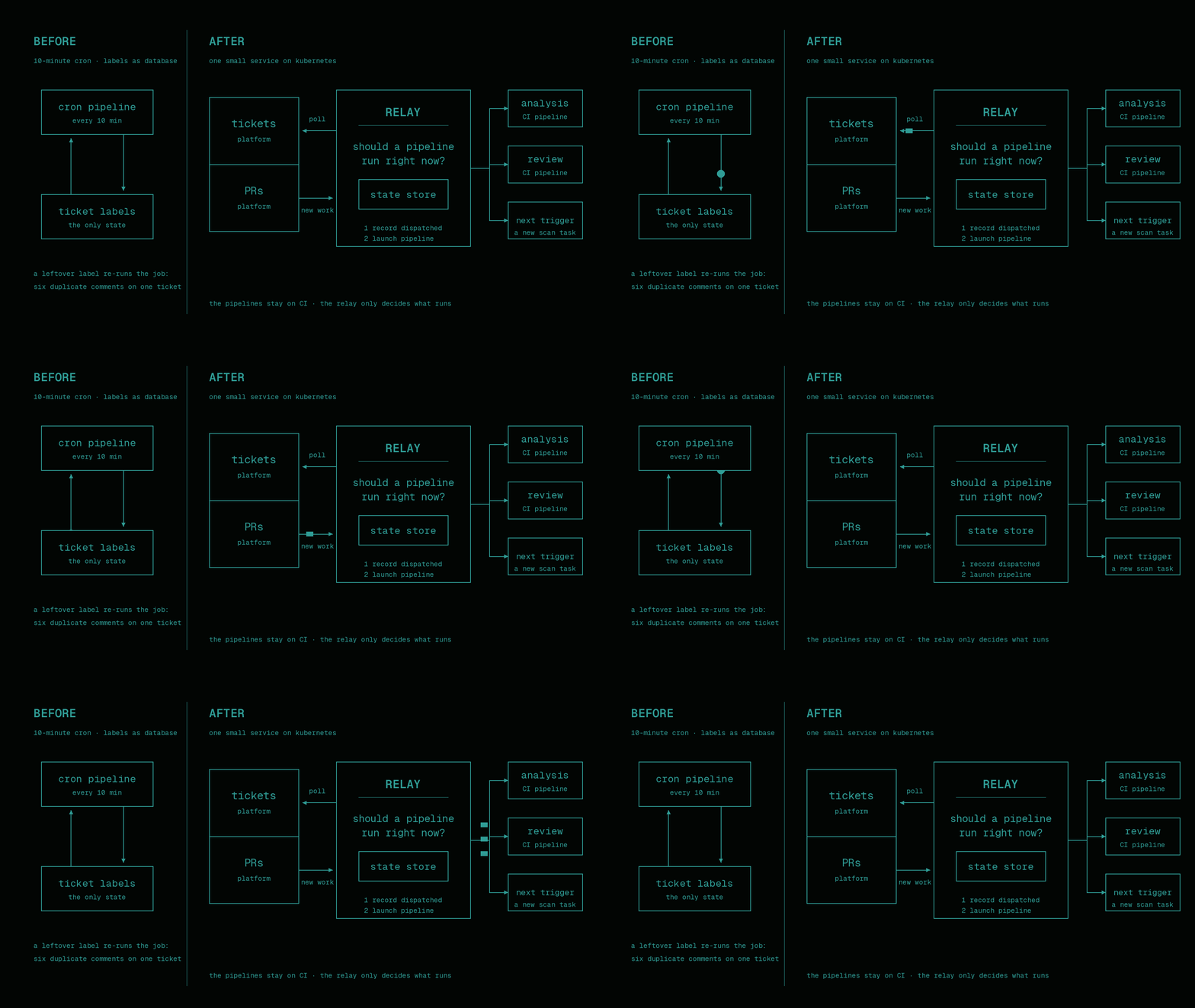
The relay got a real state store, and with it a rule we now apply everywhere: record the trigger as dispatched before calling the API that launches the pipeline. Crash between those two steps and you get an un-run trigger a human can re-fire. Do it in the other order and a crash gives you a double run. We’d already paid for that lesson with six duplicate comments on one ticket.
The approval process shaped the relay as much as the tech did. Where we work, a new service or a new service account takes weeks to get approved. One relay we keep extending was an easier sell than five microservices we’d never get through review, so when we add a new trigger type, it becomes another scan task inside the existing poll loop. No new deployment, no new approval chain.
Getting Told No
None of this was smooth. We got told no a lot, and the trick was figuring out what each no meant.
The clearest case came in June. We wanted to move the headless agent off the Kiro CLI onto something we could pin down harder in CI. My first pick was an open-source agent framework. Security denied it. The easy read of that denial is “they don’t want AI agents,” and I’ve watched internal tool efforts die right there, on a first no read as a policy statement.
I went back and asked exactly what failed the review. The tool phones home to its own hosted service for session sharing and routing. That’s an unapproved vendor receiving our data, and no amount of arguing would change it. Fair.
That answer contained the real rule, so I could ask better questions. Was a proprietary library acceptable if all its traffic stayed inside our cloud account and billing rode the existing AWS agreement? It was. Did the harness loop have to be in Go like our other services? Python was fine. Two questions flipped the decision: we landed on the Claude Agent SDK talking straight to Bedrock in our own account, telemetry disabled, no egress. That option had been available the entire time. Nobody had asked.
The other kind of no is the slow kind: approvals with long lead times. The next capability on our list needs the service account to have push rights, the one approval outside our team’s control, so we started chasing it while the feature was still a design doc instead of sitting blocked later with finished code we can’t turn on.
The security reviewer owned one specific risk: our data reaching an unapproved vendor. Once I knew that was the whole objection, we could design around it instead of arguing about it.
The Harness Is the Product
Somewhere in that stretch Sidekick stopped being a review tool in my head. It’s a harness. The model does the thinking. Everything around it, getting the right context in front of it, limiting what it can touch, checking what came back, delivering the result somewhere useful, is the harness, and the harness is the part we write.
Early Sidekick had everything in one repo: pipeline logic, prompts as inline strings inside bash, GitHub API calls next to GitLab API calls, model names hardcoded. Every new capability made the tangle worse. So we’ve been pulling the logic out, piece by piece.
Platform-shaped code is going behind a provider interface, so the rest of the code never branches on GitHub versus GitLab. Model-shaped code goes behind one seam, an AgentRunner that takes a prompt, a repo, a tool allowlist, and a task. When we swap the runtime from Kiro to the Agent SDK, the change lands inside that one module. Nothing outside it has to know.
Prompts are moving out of inline strings into files in the repo, split into named blocks: policy, tool contract, workflow, workspace context, task, output schema. A prompt change shows up in a diff and gets reviewed like any other code. Ticket text and PR comments get fenced and marked untrusted when they’re inserted, because that’s the content most likely to carry an injection.
Per-team behavior is leaving the code too: which repos are enabled, what each repo’s build command is, how results get delivered. The piece we merged this week lets teams add their own system prompts and extra context on top of the base setup, so a team layers its review policy and domain knowledge over the same machinery. One standard harness, customized per team, instead of each team writing its own agent from scratch.
What’s left in the core repo is boring on purpose. Clone, set up, invoke the agent, verify, deliver, clean up. The opinions live in the prompt files and the config, where teams can read them and argue with them.
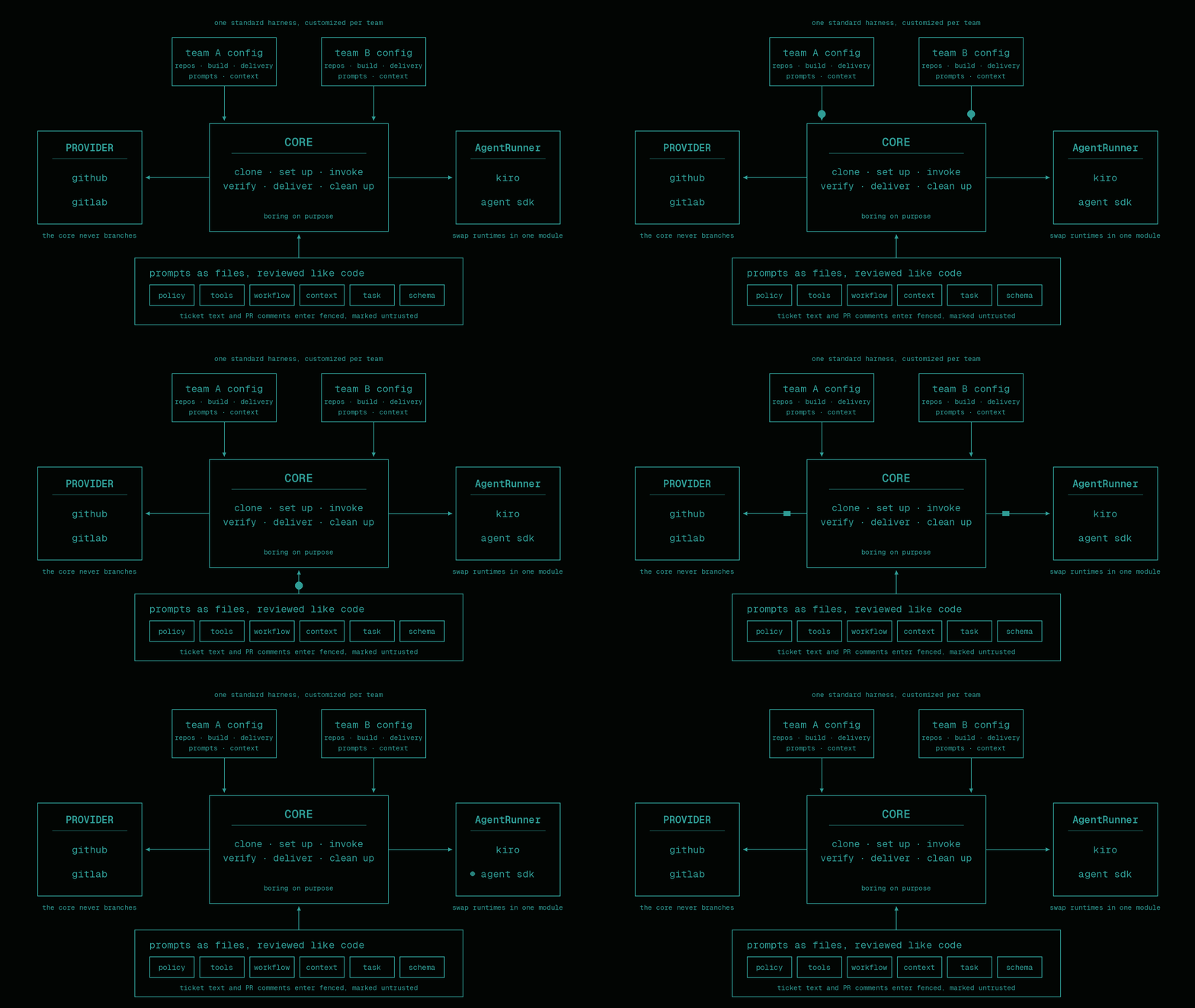
The models get better on their own; nobody ships you a better context pipeline or a stricter verification gate. That part we have to build ourselves. Anthropic’s writing on building effective agents argues for simple composable patterns over frameworks. We got to the same place by refactoring away our own mess.
Building It With the Tool It Runs On
Claude Opus, running in the Kiro CLI, wrote most of the core code. Yes, the same CLI we’re moving the runtime off of. It’s a good dev tool; we don’t want it pinned inside CI. My own job moved up a level: design docs, build prompts, and reviewing every diff before it merged.
The workflow that survived, after a few that didn’t: write the design doc first and argue it out with the team. Then break the build into dependency-ordered prompts, each one a single focused task with an explicit done-when. Hand the agent one prompt per session. Sessions that got two tasks did neither well.
The trap we kept hitting was letting sessions improvise on shared contracts. Build a producer and a consumer in separate sessions and each one invents its own shape for the data between them. The fix was obvious in hindsight: pin the schema in the design doc, make every prompt reference it, and when it changes, update the doc and re-derive both sides. A session can’t ask another session what it meant. Anything two of them share has to be written down.
The prompts also carry the opinions. “Explore the existing repo first and match its patterns.” “Make the minimal change that resolves the finding, no opportunistic refactors.” Leave those lines out and you get code that works and reads like it parachuted in from a different codebase.
Lessons
The lesson I keep coming back to is about sprawl. Over the same months, teams around the org kept spinning up their own agents: another ticket summarizer, another chat-with-the-docs bot, a review agent that duplicated one demoed two teams over. Most stalled after the demo. Getting a model to produce a decent review took us three weeks. Keeping it running unattended for months took headless auth, state, idempotent triggers, onboarding, and fixing it when it breaks, and none of that demos well. One harness that teams configure has outlasted the duplicates.
Most of our work since launch has been unglamorous for the same reason. We spent weeks refining the summary comment the review pipeline posts, because that one markdown comment is the whole user interface. The steering files went through a team review that collected nearly ninety comments. Complaints arrived within days of shipping and most got fixed within days. We could only move that fast because people were using something real instead of reviewing a spec.
The system runs unattended, so it has to recover on its own. Graceful fallbacks on optional steps, marker-based output extraction with a raw fallback, stale-label cleanup for stuck tickets, retry with quota detection. Most of those exist because the version without them failed in front of us.
We also built this next to our regular jobs. The day job came first; Sidekick got the evenings and the slow hours between reviews. We kept it moving because we wanted it to exist, and Opus did the heavy coding, so a feature that used to take a weekend took an evening.
Where It’s Going
Next, Sidekick acts on its own findings. The design is argued out and strict: a separate pipeline will hold the only write-scoped token, the pipeline rather than the agent will make the commits, one per finding, the repo’s build and tests will run before anything gets pushed, and the bot will never merge or approve. If ticket text ever prompt-injects the review agent, it can be rude, but it can’t push. Rollout starts with a per-repo allowlist and opt-in teams.
After that, cost. Today everything runs on the biggest model at the highest effort, which is lazy. The plan is a routing table in config: which model and effort each task type gets, enforced through IAM so a routing bug returns access-denied instead of a surprise invoice.
The core insight hasn’t changed since week one. Build the context pipeline right, give the model clear instructions and clean inputs, and it produces work you can use. Sidekick started as a bash script pasting a bug ticket into a prompt. The script is long gone; the harness we built around that idea is what still hands an on-call engineer a head start.
Resources
- Building Effective AI Agents, Anthropic: the case for simple, composable patterns over agent frameworks
- Effective harnesses for long-running agents, Anthropic: harness patterns for agents that outlive a single context window
- Effective context engineering for AI agents, Anthropic: the context-management discipline behind the steering-file approach